
This Ultimate Guide to Mastering Hazard Perception Test Clips will help you understand the scoring, notice when an ordinary road scene starts to change, and build reliable click timing. The aim is to respond to visible hazard cues promptly, without guessing or clicking mechanically.

Key Takeaways
- What is the key to passing? Learn to recognise when a road user or situation starts to develop into a hazard, then respond promptly.
- What should you watch? Scan the whole road scene, including junctions, pavements and areas around parked vehicles.
- When should you click? Click when you see a clear change that could affect your progress, not just because a hazard is possible.
- Is there a three-click trick? No fixed click pattern replaces watching the scene and responding to what changes.
- How do you improve? Review missed or late hazards to identify the exact cue you overlooked.
- What happens after the first hazard? Keep watching. Another developing hazard may appear later in the same clip.
How the hazard perception test works and how it is scored
The car hazard perception test includes clips showing everyday road scenes. Candidates taking the car test watch 14 video clips, as explained by GOV.UK.
Watch the whole scene rather than searching for a particular kind of road user. A pedestrian, cyclist, parked vehicle or junction may become relevant, but the hazard cue is the change in the situation, not simply the presence of an object.
The hazard perception section has a pass mark of 44 points out of 75 points available, according to GOV.UK. Use that result as a prompt to build consistent recognition and timing, not as a reason to click at every possible risk.
The hazard-perception part lasts for the duration of its clips, which play in sequence; the full theory-test sitting also includes the multiple-choice section. Plan for the complete test rather than treating the clips as a separate appointment.
Before you practise, understand what the test asks: identify a developing hazard and respond while it is taking shape. If you are preparing for lessons as well as the theory test, our lesson requirements explain how the theory test fits into the steps towards your practical test.
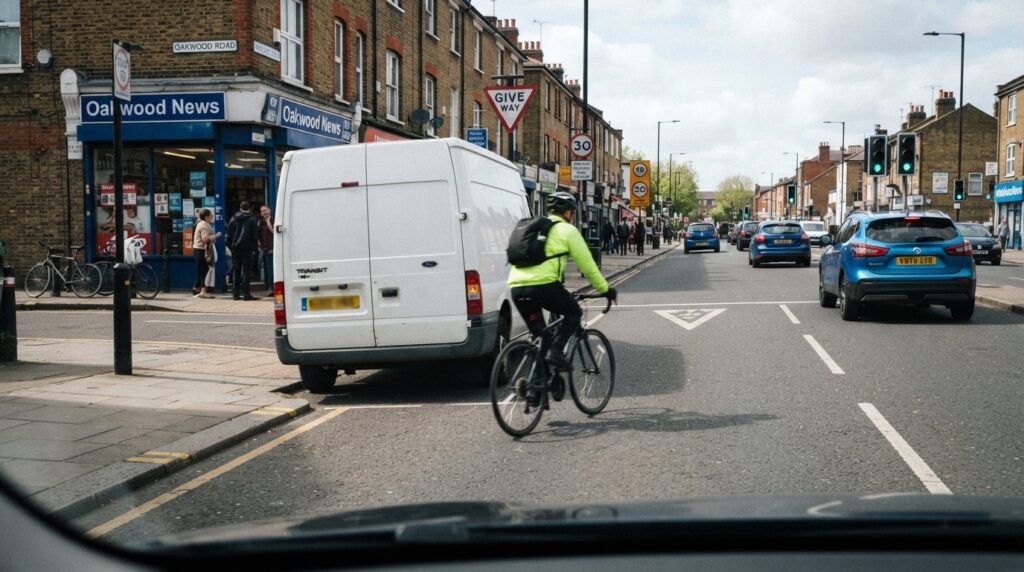
Spot the change that turns a road feature into a developing hazard
A developing hazard is a situation that begins to create a risk and may require you to change speed or direction. The useful question is not just what is in the scene, but what has changed and whether it could affect your path.
A parked car becomes relevant when something changes
A parked car by itself is a static feature. Keep watching for a door opening, a person appearing beside it or the car beginning to move, because any of these changes can bring the situation into your path.
Watch pedestrians for movement towards the road
A pedestrian standing on the pavement is not automatically a developing hazard. Look for a step towards the kerb or a crossing, and notice whether their attention appears to be on the traffic, because movement towards your route changes the risk.
Read the movement at junctions
A vehicle waiting at a junction may remain stationary, so its presence alone is not a reason to click. Watch for it edging out or moving in a way that could affect your progress.
Track cyclists and other road users
Notice changes in position and direction, not just the cyclist’s presence. For example, a cyclist moving around an obstruction may enter your path, making that movement the cue to act on.
These examples help YOU separate background detail from a meaningful hazard cue. With practice, you will start to recognise the moment a scene changes rather than reacting to every object that could possibly matter.
Click when the risk starts to develop, not before or after
Click when you first see a clear cue that a potential risk is developing, such as a road user moving into your path. Waiting until you would need to brake or swerve can leave you responding too late in the scoring window.
You can score up to 5 points for each developing hazard, according to GOV.UK. The scoring window rewards an appropriate response as the hazard develops, so aim to recognise the visible cue early instead of guessing as soon as the clip starts. A click before the hazard begins developing may earn no points; as the scene progresses, the opportunity to score narrows. Aim for the first clear, visible change—not the moment danger is unavoidable.
Do not click simply because something might become a hazard. A possible risk needs a visible change before it becomes a developing hazard, and a click tied to that change is more meaningful than an early guess.
If you hesitate, ask yourself what changed in the scene and whether that change could affect your progress. This quick check helps YOU tell a real hazard cue from background detail while keeping your response purposeful.
Keep scanning across road users, junctions and changing conditions
Scan ahead, to the sides and around parked vehicles rather than fixing your attention on a single road user. Hazards can develop in different parts of the road scene, so keep your attention moving across the clip.
In poor visibility, you may have less time to see what is happening further away. On wet roads, reduced grip also makes it important to notice cues such as brake lights, pedestrians partly hidden from view and vehicles approaching a junction.
When a hazard develops, register it with a click and continue watching. The clips contain at least one developing hazard, and a single clip features 2 developing hazards, as GOV.UK explains.
Practise a variety of road scenes involving pedestrians, cyclists, parked vehicles and junctions. If you only rehearse familiar layouts, your hazard recognition may depend on remembering the scene instead of reading what road users are doing.
Did You Know?
The response time and hazard identification data of 120 car drivers were collected and analysed using parametric survival regression and logistic regression, respectively.
Source: International Journal of Transportation Science and Technology

Avoid click patterns and the supposed three-click trick
There is no reliable fixed three-click trick for the hazard perception test. Repeated clicks at set intervals do not replace responding to what a road user or vehicle actually does.
Clicking continuously or too rapidly can look like a response pattern rather than an answer based on a hazard. Click deliberately when a meaningful cue appears, then keep observing the scene.
Clicking at every possible risk can also make your timing less accurate. Wait for the situation to begin developing, then respond to the change you can see.
Chasing a perfect score is not a useful technique. Focus instead on recognising developing hazards and responding promptly within the scoring window, without turning your practice into a guessing game.
Use a practice-and-review routine to improve timing
A useful practice clip should teach you something, not just give you another score. Watch it without pausing, then make a brief note of the road scene, the first visible cue and when you clicked.
If you miss a hazard or click late, replay the scene and identify the exact change that made it actionable. It could be a pedestrian stepping towards the road or a vehicle edging out at a junction.
Compare your response with the clip’s feedback. Work out whether you clicked appropriately as the hazard developed, clicked before the situation changed, or waited until the risk was already obvious.
Keep a short record of recurring misses, such as overlooking cyclists or focusing only on the road ahead. Choose practice clips that address those specific weaknesses, so every session has a clear purpose.
Practise in short, attentive sessions and review errors instead of repeating clips mechanically. Our aim is to help you build reliable hazard recognition and pass ASAP/SAFE with confidence and calm.
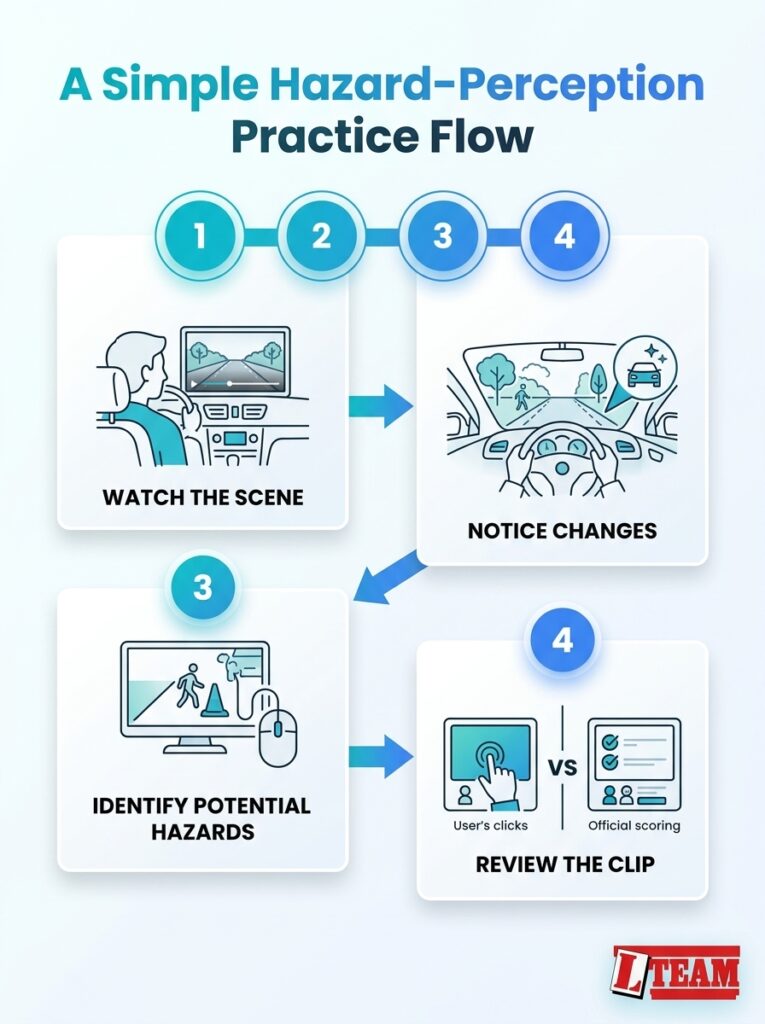
Follow this simple practice flow to spot hazards in test clips, review your results, and build hazard perception skills.
Frequently Asked Questions
Where can I get free hazard perception clips to practise?
For free practice clips, visit our useful videos page. The GOV.UK hazard perception test guidance explains the official format; choose practice clips that give feedback on the developing-hazard cue and your timing.
Can you change or review a click after a hazard perception clip has finished?
No. Once the clip has finished, you cannot go back to alter or review your response to it. Treat the next clip as a fresh scene and focus on what happens next.
What happens on the test screen after you click on a developing hazard?
A red flag appears at the bottom of the screen to confirm the click; the clip keeps playing, so continue scanning for another developing hazard. Your score is not shown at that point.
Do CGI hazard perception clips require a different approach from filmed clips?
No, the task is still to identify a developing hazard and respond to its visual cues.
Can I take the practical test if I pass hazard perception but fail multiple choice?
No. You need to pass both parts of the theory test to receive your certificate and apply for the practical test.
What is the trick to passing a hazard perception test?
There is no fixed trick; use each clip to practise noticing when a situation begins to affect your route.
Practice
Mastering hazard perception test clips comes down to recognising a visible change, clicking as the risk starts to develop and continuing to scan the whole scene. This Ultimate Guide to Mastering Hazard Perception Test Clips gives you a repeatable way to practise, review mistakes and build calm, reliable timing.
Everyone’s journey to test is different, THE L TEAM DRIVING SCHOOLS MISSION is to help you get there ASAP/SAFE.
Need to book a Driving Lesson?
Contact us Now
Tel: 03334049786